


 Recl
Recl


Find it by what you remember
Matched on meaning, not the same words
Recl remembers it for you.
Save anything in one tap — it summarizes it, files it by topic, quizzes you, and brings the key ideas back right before you forget.
Recl saves from YouTube, X, Instagram, TikTok, Substack, LinkedIn, podcasts on YouTube, articles and any web link
Sound familiar?
Your saves sort themselves
Every save lands in the right topic on its own — Startups, Psychology, Productivity and whatever else you're into. Open a topic and everything you've kept on it is there. Want folders of your own as well? Make them.
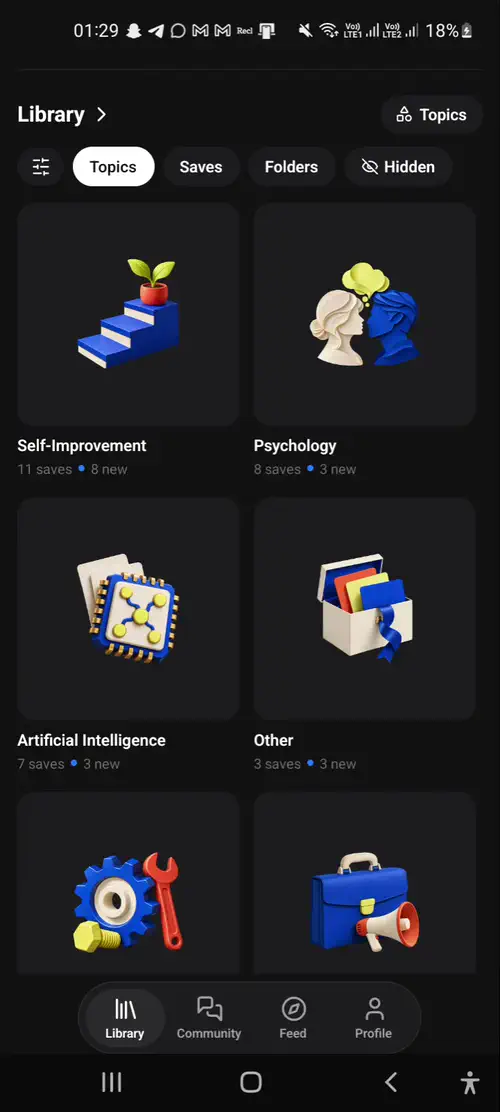
What this video shows: A silent screen recording of the Library in the Recl Android app: saves sorted into topics automatically, shown as a grid or a list, then by folder.
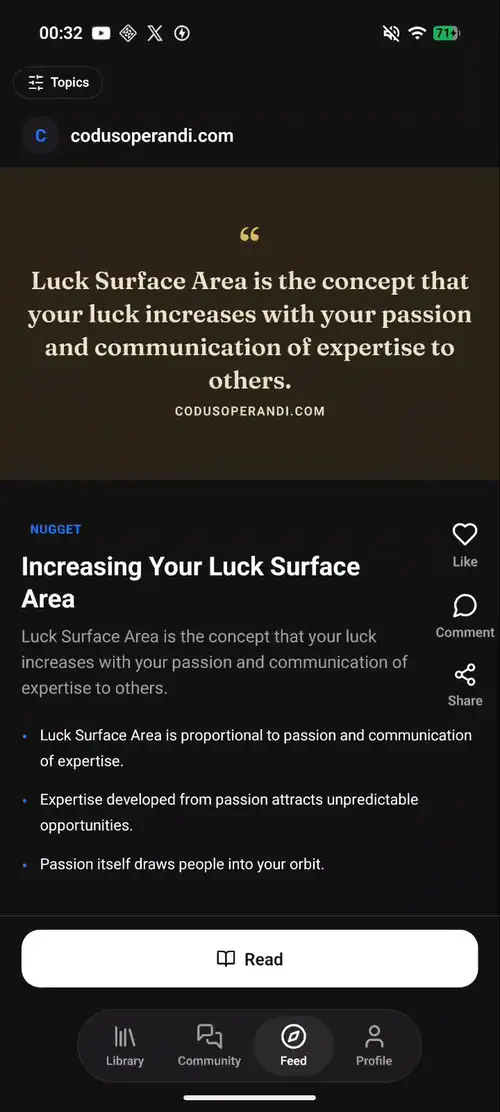
What this video shows: A silent screen recording of the Feed tab in the Recl Android app: a swipeable stream of key ideas (nuggets) from saved content.
A better scroll
The feed turns your library into a swipeable stream of key ideas — one nugget at a time, from things you chose to keep. Ten minutes in it beats an hour of someone else's algorithm.
Ask your library
Your saves become something you can talk to. Ask a question and Recl answers from what you saved, and shows you where it came from.
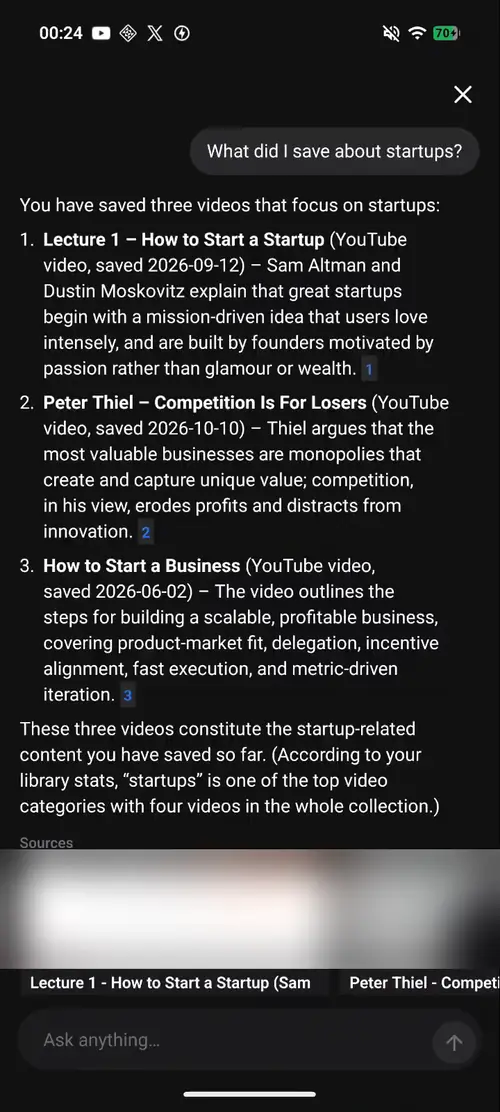
What this video shows: A silent screen recording of Ask in the Recl Android app: a question about your own saves, answered from three saved videos with their sources.
Find it again
Half-remember a video? Describe it your way in the Chrome or Edge extension and Recl finds it by meaning. Or just ask, and get an answer from your own saves, with sources. Then the knowledge graph puts ideas you met months apart side by side.
Matched on meaning, not the same words
Saved 8 months apart. Side by side, through an idea they share.
What changes
The share sheet on iPhone and Android, one click with the Chrome or Edge extension, a link pasted on the web — or DM a post or reel to @reco.save on Instagram. YouTube videos and playlists, reels, TikToks, X, Facebook and Reddit posts, podcasts on YouTube and articles.
Each week Recl writes a quiz from what you saved and sends it to your phone. Library videos come with quizzes too.
Each save returns after 1, 3, 7, 14, 30 and 60 days. One tap marks it reviewed.
Timestamps take you straight to the moment you need.
Highlight a line in a summary, add a private note, and file saves into folders of your own.
In the app, your saves form a 3D map you can spin and explore.
Chat live with other learners, reply and @mention, and climb the Leaderboard. Moderated, with report and block on every message.
Your library is yours. Share only what you choose — like a public page of your shelves.
The app speaks 20 languages and writes summaries in yours. iPhone, iPad, Android, the web, Chrome and Edge.
Your taste, on a page
Put favourite books, films, songs and quotes on shelves on your profile. Share the link and anyone can see them.
Atomic Habits
Interstellar
Stay hungry, stay foolish.
Bohemian Rhapsody
Huberman Lab
Blue Tokai, Bangalore
Pricing
No free plan — a library you pay for is one you actually use. One plan unlocks everything, monthly or yearly.
$9.00 / month
The plan most people should pick.
Start remembering$60.00 / year
$5.00 a month · save 44%
Start rememberingCancel anytime from your App Store, Google Play or web billing.
Questions
Recl is an AI learning app for the videos, reels, podcasts, posts and articles you save. Save something in one tap and Recl writes a summary of the key ideas (with timestamps for video), files it by topic, brings those ideas back on a spaced schedule — after 1, 3, 7, 14, 30 and 60 days — and quizzes you on what you saved, so you remember it. It works on iPhone, iPad, Android, the web, Chrome and Edge.
Not right now. Recl is a paid app — monthly and yearly plans both unlock every feature, and you can cancel anytime.
Yes. Recl is live on Google Play for Android and on the App Store for iPhone and iPad. There's also an extension for Chrome and Microsoft Edge, and the web app works everywhere.
YouTube videos and playlists, Instagram reels, TikToks, X, Facebook and Reddit posts, Substack and Medium articles, podcasts on YouTube, web links, notes and selected text — from the share sheet, the Chrome or Edge extension, the web, or by sending a post or reel to @reco.save in an Instagram DM.
Bookmarks pile up and you never open them again. Recl reads what you save, writes the summary, sorts it into topics, brings the key ideas back on a spaced schedule and quizzes you on them, so they actually stick.
Recl builds a structured summary with the key ideas, timestamps and topics, so you get the point without rewatching. Everything lands in one searchable library.
Yes. Every save is sorted into topics automatically — Neuroscience, Startups, Philosophy and so on — so your library stays organised without folders or tags.
Recl brings the key ideas from each save back on a spaced schedule — a day after you save it, then after 3 days, a week, two weeks, a month and two months. One tap marks it reviewed.
Yes. Each week Recl writes a quiz from what you saved and sends it to your phone as a notification, and curated videos in the public library have their own quizzes. Quizzes are in the iPhone, iPad and Android app.
Yes. Ask your library a question and Recl answers from your own saves, with links to the ones it used.
Yes. The web app includes a knowledge graph that links your videos, articles and notes by the topics they share, and the app shows your knowledge base as a 3D map you can explore.
Yes, for Recl Pro members. Community is a live chat in the app where members talk about what they're learning, with replies and @mentions. Members can also like and comment on cards in the Feed and appear on the Leaderboard. Messages disappear after an hour, links aren't allowed, abusive words are blocked, and any message can be reported.
Your library is private. If you want, make a public profile with shelves of favourite books, films, quotes and music, and share the link.
Recl writes summaries in your app's language, so you can save a video in one language and read the summary in yours. The app comes in 20 languages.
Plans renew automatically until you cancel. Cancel anytime from your App Store or Google Play subscriptions, or from billing on the web.